Exporting Parameters
The Parameters tab of the Export section writes the project's current calibration parameters into a SWAT+ Editor project database (SQLite), as calibration entries. Use this to move a calibrated parameter set from the Toolbox back into the SWAT+ Editor project the model came from. SWAT+ Editor then writes them to calibration.cal like a calibration entered by hand.
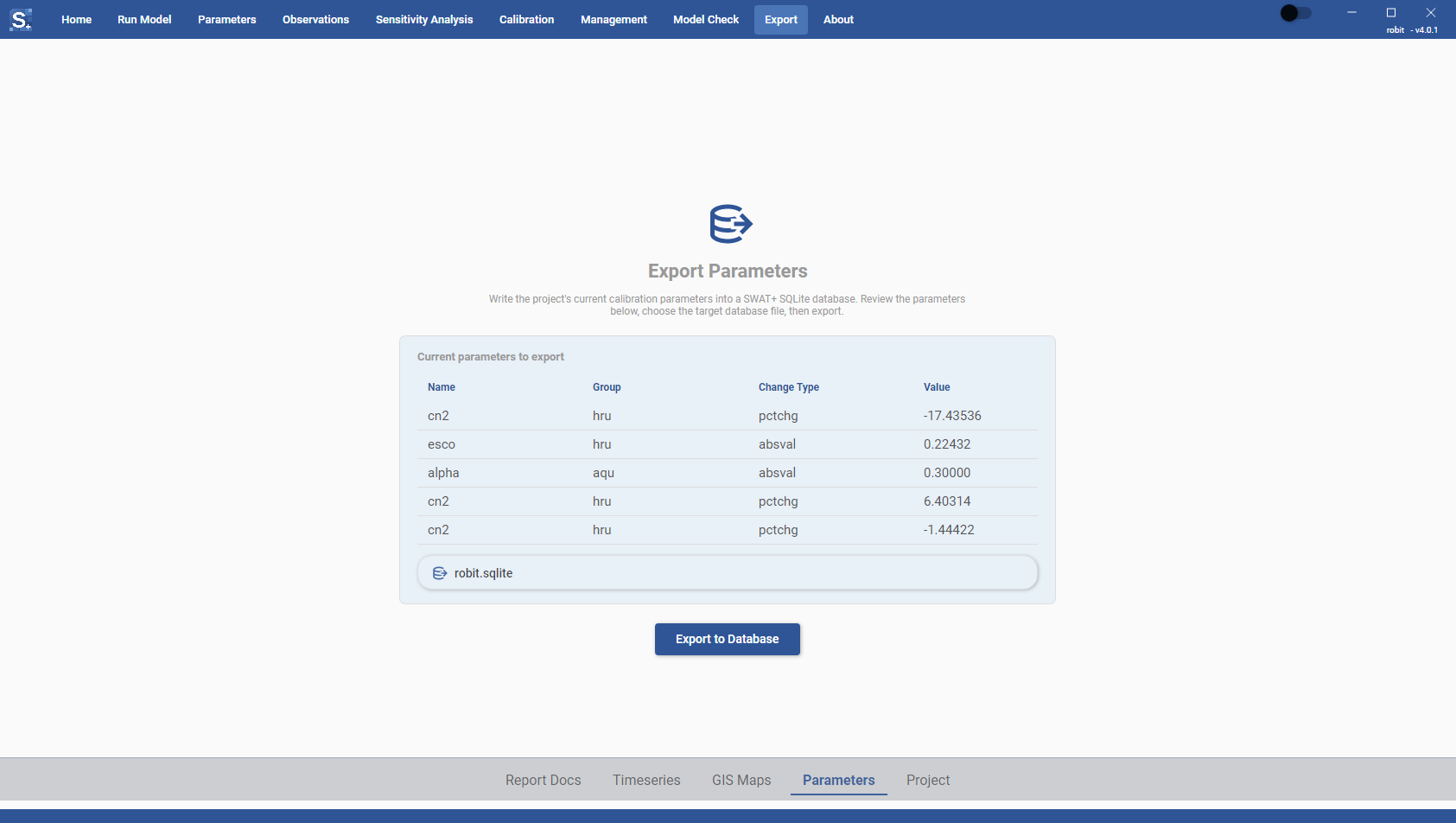
Exporting
- Check the list under Current parameters to export. It shows each parameter's Name, Group, Change Type and Value, as set on the Parameters page. Only parameters that are ticked in the Enabled column on the Manual calibration page and have a value are listed, because these are the ones the export writes.
- Check the database shown on the button below the list. When the project folder has a
gis.datafolder, the Toolbox selects the SWAT+ Editor project database in it:gis.data/<project name>.sqlite, or the only.sqlitefile there apart fromswatplus_datasets.sqlite. To use another database, click the button (Click here to select SQLite Database when nothing is selected) and pick the file (.sqliteor.db). The file picker opens ingis.data. - Click Export to Database.
Export to Database stays inactive until there are parameters to export and a database is selected. If no parameter is enabled with a value, the tab shows No parameters to export instead of the list. Add parameters in the Parameters section first.
Result
When the export finishes, a summary appears below the button. You can select and copy its text. It gives:
- the number of parameters written, with the number of objects and conditions written for them, and the database file name
- how many calibration rows were in the database before and have been replaced
- the path of the copy of the database taken before the export
- under Not exported, anything that was left out, with the reason
The summary ends with a reminder to open the database in SWAT+ Editor and write the input files, which is what puts the parameters into calibration.cal. If the export fails, the summary reads Export failed: followed by the error.
Backup of the database
The export replaces every calibration entry already in the database. Before it writes anything, it copies the database to a file next to it named <database>.before-toolbox-export-<yyyyMMdd-HHmmss>, for example myProject.sqlite.before-toolbox-export-20261019-143005. Each export makes a new copy. To go back to the old calibration, close SWAT+ Editor and put the copy back in place of the database, with the original file name.
Parameters written
Each parameter is written with its change type, its value and the objects it is assigned to. If the parameter's Conditions switch is set to Yes, its conditions are written too. Conditions for a property that does not apply to the parameter's object type are left out. Soil layers and year or day limits are not written, so set them in SWAT+ Editor if you need them.
Items in the Not exported list are of these kinds:
- a parameter whose name is not in the database's parameter list (
cal_parms_cal), which SWAT+ Editor cannot store; the parameter is not written - objects on a basin parameter, which applies to the whole basin; the parameter is written without them
- object numbers larger than the number of objects of that type in the database; the other objects are written
- conditions on a database that has no table for them; the parameter is written without its conditions
The export fails if the file you pick is not a SWAT+ Editor project database. If it fails part way, the database is left as it was.